AI Reply Suggestions: Smart Reply Chips and AI Answers in Your Inbox
AI reply suggestions help your team answer the same questions faster without retyping them. In LiveChatBot, Smart Reply chips appear in the inbox and offer replies picked from your saved replies and help articles, while the AI Agent can answer visitors directly from your knowledge. This page explains what each does, how to set it up and where the limits are.
Illustrative conversation. The chips come from your own saved replies.
Real screens
See it in the LiveChatBot app
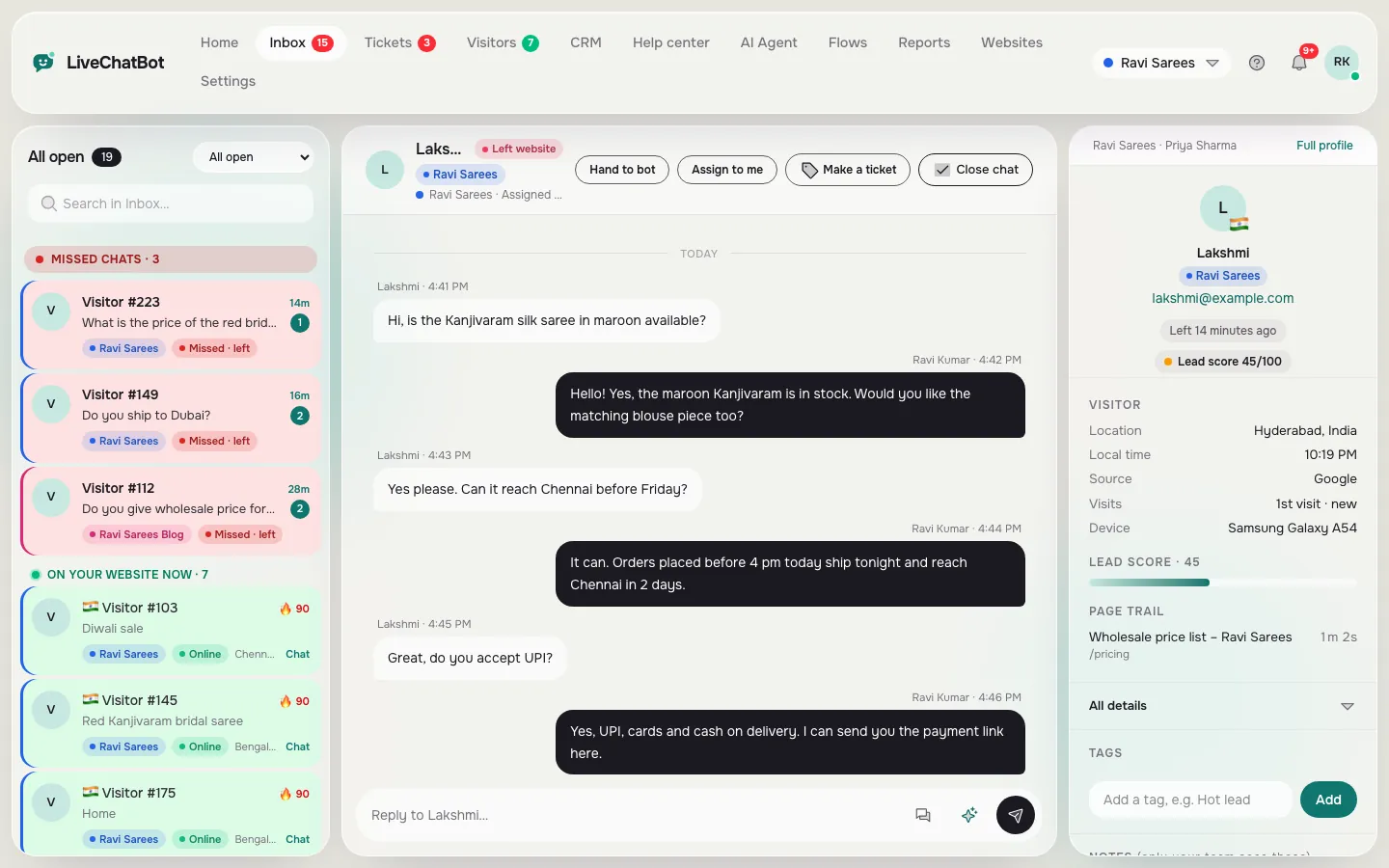
Real screens from the LiveChatBot panel, shown with sample data. Click any picture to see it full size.

⚡ In short
- Smart Reply suggests replies in the inbox. It matches the visitor’s words to your saved replies and help articles, and it is free.
- The AI Agent answers visitors directly from your Knowledge, with rules and a handover to your team.
- Both only use what you have written. Neither invents facts.
- Smart Reply does not write new text from scratch, and there is no sentiment analysis.
What it does
AI reply suggestions in two places: your inbox and your widget
People use the phrase “AI reply suggestions” for two different things, so it helps to separate them.
Smart Reply is for your team. When a visitor sends a message, the inbox shows reply chips matched by keywords from your saved replies and help articles. You tap a chip, the text goes into the reply box, you adjust it and send. No AI is involved in this step, so it costs nothing and works on the free plan.
The AI Agent is for your visitors. It reads the question and answers from the knowledge you have given it, including text, pages from your website and uploaded PDF, CSV, XLSX, DOCX and TXT files. It follows a “Rules to follow” box, a tone, a reply length and handoff topics that send the chat to your team. AI replies are a premium feature with a small free monthly allowance per website; when that is used up, the free keyword bot answers from saved replies.
Smart Reply helps the person typing. The AI Agent helps when nobody is there to type. Most teams use both: the AI Agent takes the first questions, and Smart Reply speeds up everything a human handles.
How it works
How suggestions get built from your own answers
The suggestions are only as good as the material behind them, so the setup is mostly writing short, clear answers once.
Steps to set up Smart Reply
- Open Saved replies and write one reply for each question you get often: delivery, prices, opening hours, returns, booking.
- Add the words customers actually use in the reply title or text, including short forms and local terms.
- Publish a few Help center articles for longer answers. Published articles also feed the suggestions.
- Open a chat, read the chips and tap one. Edit the wording if the question had a twist.
- After a week, look at which questions had no chip and write a reply for each.
Saved replies support {name}, which fills in the visitor’s name when you send. Our guide to saved replies covers how to build a set that stays easy to maintain.
Steps to set up the AI Agent
Add your knowledge, pick a name and tone, write rules such as “never promise delivery dates”, choose the topics that must go to a person and test with real questions. How to train your AI chatbot walks through it.
Who it is for
Who gets the most from Smart Reply
Smart Reply and the AI Agent pay off most where questions repeat.
- Small shops and service businesses that answer the same ten questions every day about price, stock, delivery and timing.
- Teams of two to five who share an inbox and want consistent wording without a long training manual.
- New staff who do not yet know the answers. Chips show them how the business replies.
- Owners who are away from the desk and answer from the Android app. Tapping a chip is quicker than typing on a phone.
- Businesses with after-hours traffic where the AI Agent covers the first reply and the team picks up in the morning.
It matters less when every chat is unique, for example bespoke consulting inquiries. In that case, the value lies in handover and ticketing rather than canned answers. See canned responses for how to decide what to save.
There are no per-seat charges, so everyone on the team gets the same suggestions at no extra cost.
Better answers
Keep suggestions accurate and on-brand
A suggestion is a draft, not a decision. A few habits keep quality high.
Write for the customer, not for yourself
Short sentences, plain words, the key fact first. “Delivery to Denver takes 3 to 5 business days” beats a paragraph about logistics.
Keep one source of truth
If prices change, update the saved reply or Knowledge entry once. Avoid keeping the same price in six places.
Review the edits
When agents often change a chip before sending, that is a sign the saved reply needs rewriting. Update it so the next person starts closer to the final answer.
Use rules for behavior
For the AI Agent, facts such as prices and policies go in Knowledge. Behaviour such as tone, what to avoid and when to hand over goes in the Rules box, which takes up to 5,000 characters. The free keyword bot cannot follow written rules, so rules apply only while AI replies are on.
Check the chat reports
Reports show first response time, response rate and conversations resolved by the AI, so you can see whether suggestions are making a difference.
Limits
What AI reply suggestions do not do
Being clear about limits saves disappointment.
- Smart Reply does not write new text. It suggests existing saved replies and articles. It does not draft a fresh reply from the conversation inside the agent’s typing box.
- No sentiment analysis. The product does not score a visitor’s mood.
- You cannot choose the AI model or add your own provider key. The provider is set by LiveChatBot on the server.
- No automatic assignment. Agents use “Assign to me”, and the inbox has Unassigned and Mine folders.
- AI replies are a premium feature. There is a small free monthly allowance per website, then AI packs. When it is used up, the free keyword bot answers from saved replies.
If an answer is not in your saved replies, your Help center or your Knowledge, the suggestion will not appear. That is deliberate: a missing suggestion is better than a confident wrong answer.
Get started
Turn on AI reply suggestions in an afternoon
Sign up at livechatbot.in, add the widget and write your first ten saved replies. Open a test chat from your own phone and check the chips. Then add Knowledge for the AI Agent and try it with questions you never taught it. The AI Agent page has the details at AI Agent, and pricing shows the free plan and visitor packs.
Frequently asked questions
Are AI reply suggestions free?
Smart Reply chips are free and need no AI. The AI Agent has a small free monthly allowance per website, then AI packs.
Where do the suggestions come from?
They are matched by keywords from your saved replies and published help articles.
Will it write a reply from scratch?
No. Smart Reply suggests existing replies. It does not compose new text in the agent’s typing box.
Can I stop the AI from saying certain things?
Yes. The AI Agent follows a Rules to follow box and handoff topics, while AI replies are on.
What happens when the AI allowance runs out?
The free keyword bot answers from your saved replies, and your team can still reply as usual.
Keep reading
Related guides
How to Answer Chats Faster: A Seven-Step Routine for Small Teams
AI Assistant for Support Agents: What It Can Do, What It Cannot, and How to Choose
Answer the same questions in seconds
Free plan for two websites with Smart Reply and no per-seat charges. Start free on livechatbot.in.