Visitor Profiles: Know Who You Are Talking To Before You Type a Reply
Visitor profiles collect everything LiveChatBot knows about one person in one place: where they are, their local time, how they found you, the pages they read, their device, their lead score and every chat, form and deal. You can open a profile from any chat, from the live visitor list or from your contacts.

⚡ In short
- Every visitor gets a profile: location, local time, network, language, device, source and lead score.
- The page trail shows every page they read and how long they stayed.
- Add name, email, phone, company and job title; add tags, private notes and deals.
- Visitors → All contacts lists everyone who visited, chatted or left their details.
Real screens
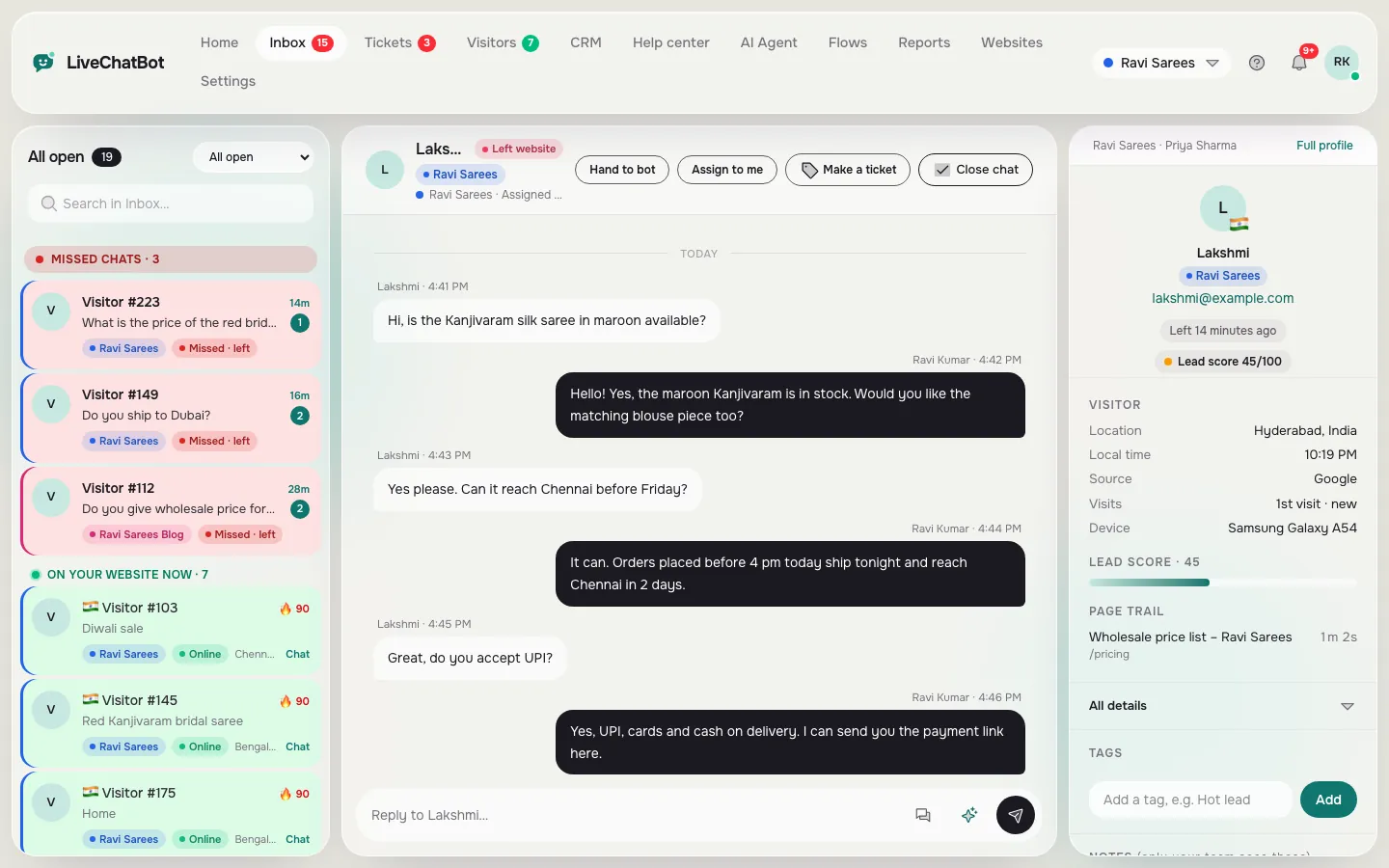
A profile, your contacts list, and the profile beside a chat
Real screens from the LiveChatBot panel, shown with sample data. Click any picture to see it full size.

Why
Replies get better when you know the context
Most chats start with a short question like “Price?” or “Is this available?”. Without context you have to ask three questions back before you can help, and many visitors leave during that back-and-forth.
With a profile open next to the chat, you already know the answer to most of those questions. You can see that the visitor is on the wholesale price list, came from a Google search for bridesmaid dresses in bulk, is on a phone in Chicago, and this is their second visit this week. Your first reply can be specific, and specific replies are the ones that turn into orders.
Context also protects your time. A visitor who has read your pricing page three times and stayed for minutes is worth a quick personal reply. A visitor who bounced from a blog post and asked something off-topic can get a short saved reply. Knowing the difference lets a small team spend its attention where it pays back.
What is on a profile
Everything on one page
About the person
Their name, email and phone if they shared them, plus company and job title you can add yourself. A color label shows which of your websites they visited.
Location and time
City, region and country from their IP address, their local time (so you know if it is morning or midnight for them), their network and their browser language.
How they found you
The source of each visit: Google, Google Ads, Instagram, Facebook, YouTube, WhatsApp, Bing, another website or direct. The landing page is kept too.
What they read
The page trail lists every page they opened and how long they stayed on each. It is often the best clue to what they want.
Device and visits
Phone or computer, the model when the browser shares it, and how many times they have visited.
Lead score
A score from 0 to 100 based on visits, pages and time spent. A high score means “this person looks ready to buy”, and you can get an alert when someone crosses your hot-lead score.
Your notes
Tags, notes and deals your whole team can see
A profile is also where your team writes things down. Tags like Hot lead, Wholesale or Complaint make people easy to find later. Private notes stay inside your team: “Asked for 20 pieces, call back on Friday” is visible to whoever answers next time, even if it is a different person.
When a conversation turns into real business, press New deal to add it to your free sales pipeline CRM. The deal stays linked to the person, so you can open the profile from the deal and the deal from the profile. You can also plan an activity, like a call tomorrow, and it shows on the timeline.
Timeline
The full story, in order
Every chat, form submission, deal and activity shows on the profile in date order. If a visitor filled your contact form last week, chatted today and became a deal, you see all three, so nobody has to scroll through old emails to understand the history.
Forms are caught by the chat code automatically; see form submission tracking.
Contacts
All contacts, leads and subscribers in one list
Visitors → All contacts lists everyone, newest first, with their location, number of visits, source and when you last saw them. Switch the view to see only leads (people who left an email or phone number) or subscribers. Click any row to open the profile.
You can search by name, email or phone, and filter by website. Form submissions can be downloaded as a CSV file if you want to work with them in a spreadsheet. Live visitors right now are on a separate page; see visitor tracking.
Examples
How different businesses use a profile (illustrative)
These are illustrations of common patterns, not customer stories.
An online bridal shop
A visitor asks “Free returns?”. The profile shows they are in Denver, on a phone, and spent four minutes on a wedding gown page after arriving from Instagram. The reply covers free returns and offers the matching veil. A tag “Bridal” goes on the profile so the team can send new bridal arrivals later.
A coaching center
A parent writes at 10 pm. The profile shows they read the fee page twice this week and came from a Google search for weekend classes. The counsellor sees the local time, answers briefly that night, and adds a note: “Call Saturday morning about the weekend class.”
A B2B supplier
A visitor from a company network reads the wholesale price list and the delivery page, then asks about 200 units. The sales person adds the company and job title, presses New deal with an expected value, and plans a call for tomorrow. The deal, the chat and the call all sit on one profile.
Privacy
Honest limits and privacy
Location is approximate
City and region come from the IP address. They can be wrong for VPNs and some mobile networks.
Names only when shared
A visitor stays “Visitor #123” until they share their name or you add it.
Tell visitors
Mention chat and visitor tracking in your privacy policy. Our privacy policy explains what LiveChatBot stores.
Get started
See your first visitor profiles today
Create a free account at livechatbot.in and add the chat to your website. Visit your own site from your phone, open a couple of pages and send a message. In the inbox, press Full profile on that chat and you will see your own visit: city, device, pages and time on each. Within a day your real visitor profiles will start filling up.
Frequently asked questions
What is a visitor profile?
One page with everything LiveChatBot knows about a visitor: location, local time, source, pages read, device, lead score, contact details, notes, deals and past chats.
Where does the location come from?
From the visitor’s IP address, shown as city, region and country. It is approximate.
Can I add a visitor to my sales pipeline?
Yes. Press New deal on the profile and it appears in CRM → Pipeline, linked to the person.
Can my team see my notes?
Yes. Notes are private to your team, so everyone who answers sees them.
Can I export contacts?
You can download form submissions as a CSV file.
Keep reading
Related guides
Website Visitor Analytics That Ends at a Lead: See Where Visitors Come From, What They Read and Who Acts
What Visitors Search on Your Website, and Five Ways to Turn Those Searches Into Pages, Answers and Sales
Website Analytics Without Google Analytics: Four Simple Routes for Small Sites, and the Questions Each One Can Answer
Know who you are talking to
Location, local time, pages, source and past chats beside every conversation. Start free on livechatbot.in.